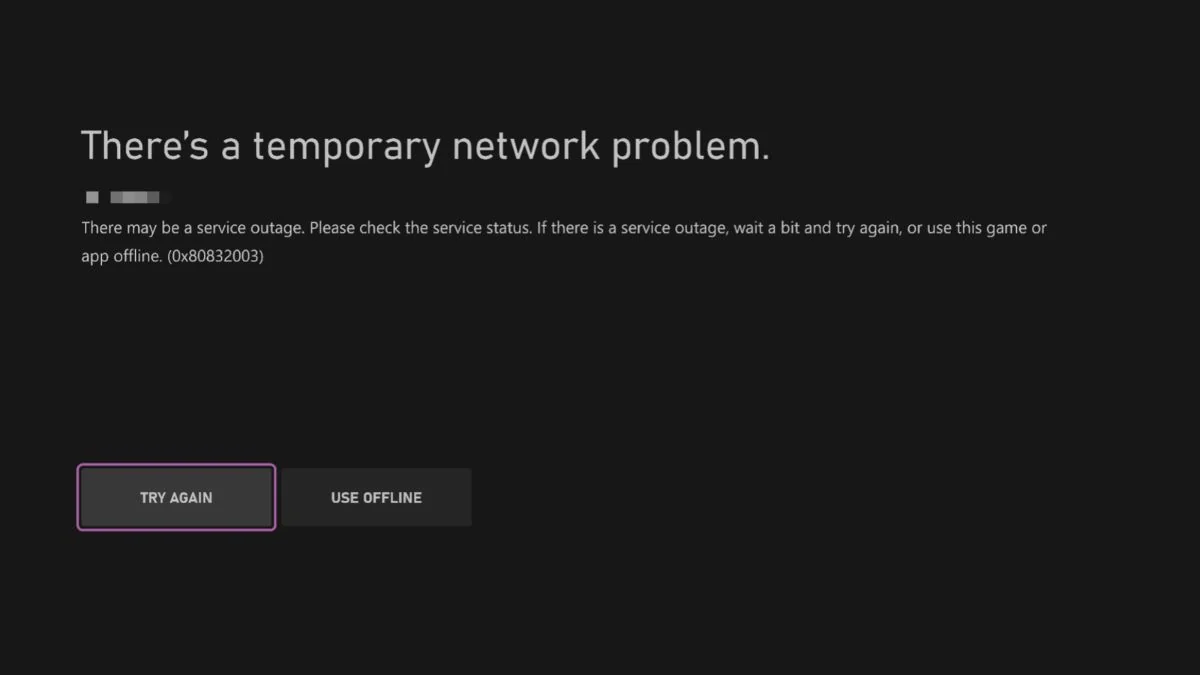
Trying to launch GTA 6 on Xbox Series X|S only to receive a “Temporary Network Problem” message can be frustrating, especially when the game is already installed and ready to play.
One error code associated with this message is 0x80832003. According to Xbox Support, this code may indicate a temporary problem with the Xbox network.
In other words, the issue does not necessarily mean that something is wrong with your GTA 6 installation or console.
If you’re experiencing this error, don’t rush to uninstall the game or reset your Xbox.
Start with the simplest checks, including Xbox service status, restarting the game, and testing your internet connection.
Here are the steps you can try to fix GTA 6 error 0x80832003 on Xbox.
Fix GTA 6 Temporary Network Problem on Xbox
Try these troubleshooting steps in order. Checking service status first can save you from wasting time changing console or router settings when the problem is on Microsoft’s side.
1. Check Xbox Network Status
Before changing anything on your console, check whether Xbox services are experiencing an outage.
Visit the official Xbox Network Status page and look for reported problems affecting account sign-in, gaming, multiplayer, or other relevant services.
If Microsoft reports an interruption, the error may be outside your control. Wait for the affected service to recover and then try launching GTA 6 again.
There is little point in restarting your router or reinstalling the game while an Xbox network outage is still affecting the service you need.
2. Select Try Again
If the error screen gives you a Try Again option, select it and give your console another moment to connect.
A temporary connection failure may clear on its own, allowing GTA 6 to launch normally.
You may need to try again after waiting briefly. However, repeatedly selecting the option is unlikely to help if Xbox services are experiencing an ongoing outage.
3. Check Rockstar Games Service Status
Although error 0x80832003 is associated with the Xbox network, it is also worth checking Rockstar’s services.
Visit the Rockstar Games Service Status page to see whether the relevant services are reporting problems.
If Rockstar reports an interruption, wait until the affected service is restored before trying again.
Keep in mind that Rockstar’s service status and Xbox’s network status are separate. One can be working normally while the other is experiencing problems.
4. Fully Close and Relaunch GTA 6
Sometimes, simply returning to the Xbox dashboard does not fully close a running game. Close GTA 6 before launching it again.
- Press the Xbox button on your controller.
- Highlight GTA 6 in the guide or your recent games.
- Press the Menu button on your controller.
- Select Quit.
- Wait a few seconds, then launch GTA 6 again.
This gives the game a fresh start and may resolve a temporary launch or connection issue.
5. Restart Your Xbox Series X|S
If closing the game does not help, restart your console.
- Press the Xbox button on your controller.
- Open Profile & system.
- Select Power.
- Choose Restart console.
- Wait for the console to restart completely.
- Launch GTA 6 again.
A full restart can clear temporary system problems and refresh the console’s connection to Xbox services.
6. Test Your Internet Connection
If Xbox services are operational but the error continues, check whether your console has a stable internet connection.
On your Xbox Series X|S:
- Press the Xbox button.
- Open Profile & system and select Settings.
- Choose General.
- Open Network settings.
- Select Test network connection.
If the test fails, follow the troubleshooting instructions displayed on your console.
You can also try opening another online game or using another Xbox network feature to see whether the connection works outside GTA 6.
7. Restart Your Router and Modem
An unstable home network can sometimes prevent your Xbox from connecting properly.
To restart your network equipment:
- Turn off your router and modem.
- Unplug their power cables.
- Wait approximately 30–60 seconds.
- Plug the devices back in.
- Wait until your internet connection is restored.
- Restart your Xbox and try GTA 6 again.
If you normally use Wi-Fi, try connecting your console through an Ethernet cable if one is available. A wired connection can help rule out wireless interference or a weak Wi-Fi signal.
8. Check Your NAT Type
Your Xbox’s NAT configuration can affect certain network and multiplayer features.
To check it:
- Open Settings on your Xbox.
- Select General.
- Choose Network settings.
- Look for NAT Type.
An Open NAT generally provides the fewest restrictions for online connectivity. Moderate or Strict NAT can cause problems with some network features.
If your NAT type is Strict or unavailable, check your router’s configuration or contact your internet provider for assistance. Avoid changing advanced router settings unless you understand what they do.
9. Check for Xbox System Updates
Make sure your Xbox Series X|S is running the latest available system software.
- Press the Xbox button.
- Open Profile & system.
- Select Settings.
- Choose System.
- Open Updates.
- Install any available console update.
Restart your console if prompted and try launching GTA 6 again.
10. Try Another Xbox Game
If the error still appears, try launching another game.
This is a useful way to narrow down the cause:
- Other games also have network problems: The issue may involve Xbox services, your internet connection, or your console’s network configuration.
- Other games work normally: The problem may be specific to GTA 6 or a service required by the game.
- Only your Xbox profile experiences the problem: There may be an account or sign-in issue worth investigating.
If the problem only affects GTA 6 while other games work normally, check for game updates and contact Xbox or Rockstar Support if the issue continues.
What Does Xbox Error 0x80832003 Mean?
The error code 0x80832003 is associated with a temporary Xbox network problem that can prevent players from launching or playing a game.
It may appear when your console cannot properly access an Xbox network service.
This can happen during a service interruption, but local connection problems may also be worth investigating if Xbox services are working normally.
Possible causes include:
- A temporary Xbox network service disruption
- An unstable internet connection
- A problem with your router or modem
- A temporary Xbox console or system issue
- A game-specific connection or service problem
Importantly, seeing this error does not automatically mean GTA 6 is corrupted or needs to be reinstalled.
Do You Need to Reinstall GTA 6 to Fix Error 0x80832003?
No. Reinstalling GTA 6 should not be your first troubleshooting step.
Error 0x80832003 is associated with a temporary Xbox network problem.
If Microsoft is experiencing a service outage, deleting and downloading GTA 6 again will not fix the underlying issue.
Start by checking Xbox and Rockstar’s service status, restarting the game, and testing your internet connection.
Consider reinstalling GTA 6 only if there is separate evidence of a damaged or incomplete installation and the network services are working normally.
Otherwise, you could spend hours downloading the game again without solving the problem.
Can You Play GTA 6 While Xbox Network Services Are Down?
That depends on the game’s connection requirements and the type of service interruption.
Some Xbox games offer offline modes that remain playable during network outages.
However, online features, account verification, digital licensing checks, or other required services may still prevent a game from launching.
If GTA 6 offers an available offline mode and your console can access it, you can try playing without a network connection. Do not assume that every version or game mode will work offline.
What If GTA 6 Error 0x80832003 Still Won’t Go Away?
If none of these steps works, the problem may be related to an Xbox service, your account, or a connection issue that requires further investigation.
Before contacting support, make a note of:
- The exact error code and message
- Whether other Xbox games launch normally
- The result of your console’s network connection test
- Whether Xbox and Rockstar services report any interruptions
You can then contact Xbox Support or Rockstar Support for further assistance.
Most importantly, don’t immediately delete GTA 6 or factory-reset your Xbox. Error 0x80832003 does not automatically indicate a problem with your game installation.
If the cause is a temporary network disruption, waiting for the affected service to recover may be all you need to do.
FAQs
What is GTA 6 Xbox error 0x80832003?
Error 0x80832003 is associated with a temporary Xbox network problem. It can prevent your console from accessing the services needed to launch or play a game.
Is error 0x80832003 caused by GTA 6?
Not necessarily. The code is associated with Xbox network problems, so the issue may be related to Microsoft’s services rather than GTA 6 itself.
Will restarting my Xbox fix error 0x80832003?
It may help if the problem is caused by a temporary console or network issue. However, restarting your Xbox will not resolve an ongoing Xbox service outage.
Should I reinstall GTA 6?
No, not as your first step. Check Xbox and Rockstar service status, restart the game, and test your connection before considering a reinstall.
How long does Xbox error 0x80832003 last?
There is no fixed recovery time. If the error is caused by an Xbox service interruption, you will need to wait until Microsoft restores the affected service. Local network problems may require additional troubleshooting.
Where can I check whether Xbox services are down?
Visit the official Xbox Network Status page for service updates. You can also check Rockstar Games Service Status for problems affecting Rockstar services.